

Digital asset management
Know what your library is doing
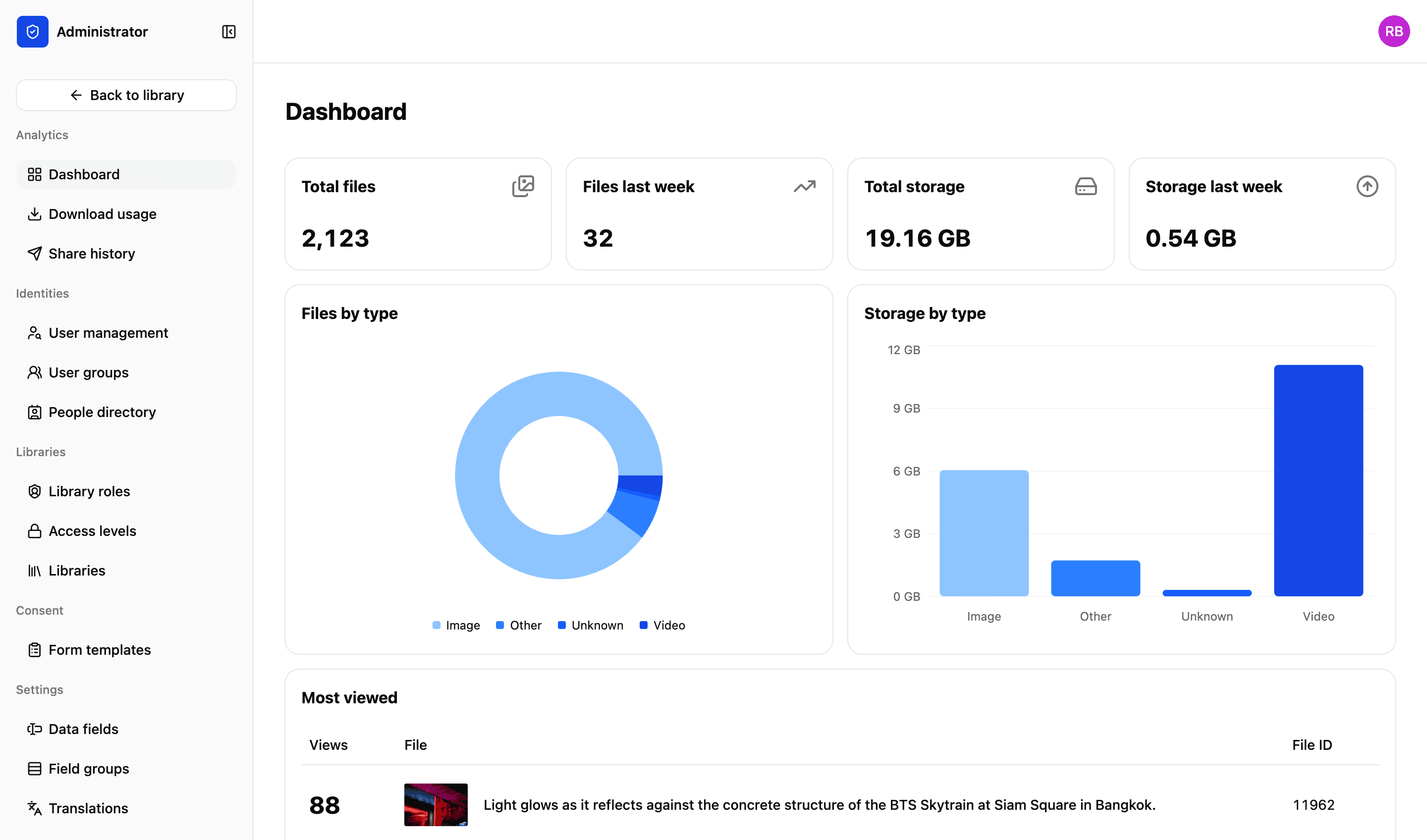
Files, storage, what kind of files are eating it, and the ones everybody keeps returning to — on one dashboard. Underneath it, a record of who did what with which file, and when they did it.
Admin dashboard
Last 30 days
- 214,880
Total files
- 1,284
Files last week
- 18.1 TB
Total storage
- 240 GB
Storage last week
Recent activity
- Download · coastline_0142.jpgRukayat Mensah · 12 Jul, 14:22
- Share created · Annual report selectsLéa Fontaine · 12 Jul, 11:05
- Upload · 84 files to Asia PacificKanya Suphan · 11 Jul, 18:40
Illustrative example
What the admin side shows you
The four questions somebody asks you about the library, answered before they ask.
01
Files and storage
How much you hold in total, and how much of it arrived last week. Storage grows with you rather than triggering a new quote.
02
What is taking the space
Files by type beside storage by type. The two rarely agree — the video is a rounding error in one and most of the bill in the other.
03
Most viewed
The files everybody keeps coming back to. Rarely the ones you would have guessed, and useful for deciding what to shoot next.
04
Download and share usage
Who is taking what, and which links are being used. Each has its own page rather than being buried in a monthly export.
History
Every download, share and upload, with the detail
Not a count — a list. Which file, which person, which library, at what time, and for a share, what the link allowed them to do. This is the report you run when somebody asks a question about one particular file.
- Download, share and upload history, each kept separately
- Filter by person, file, library or date
- Set a download limit on a file that is being taken more often than it should be
More in the platform
Libraries and folders
Run as many libraries as you have teams, offices or regions. Each gets its own drive, its own folders and its own people.
Read more
Upload and file-drop
Uploads that resume when a browser dies, and file-drop links that let someone outside your organisation upload to a specific library, workspace or collection.
Read more
Search and filters
Search across one or all your libraries. Find files using standard and custom filters. Use facial recognition to find pictures of people.
Read more
Workspaces
A collaborative space for your projects. Invite individuals or groups. Assign specific permissions — view, edit or comment. You decide.
Read more
Sharing files
Send files using private expiring links. Set download limits, resize files and add custom watermarks and information to protect your content.
Read more
Permissions and access
Set access on a file or a collection, build custom roles to match your organisation’s exact needs and decide what each one can do.
Read more
API and integrations
We migrate your existing library and connect the platform to what you already run. A REST API lets you build your own portal on top of it.
Read more
Next step
We’d love to explain more…
Still got questions? Curious to see LightRocket in action? Want to know more about pricing?
We’re always happy to show off our system and, yes, we’ll even help out with discounts and pricing.